
Your data and privacy
Token Optimizer runs entirely on your machine. Its normal measurement reads files that already exist and writes local data stores. Optional host invocations and explicitly configured network surfaces are described below. This page is the operator reference for exactly what is stored, where, for how long, and how to delete it.
No external data transmission
Section titled “No external data transmission”- No core analytics upload. The separate opt-in Cowork probe/OTel flow can send data to the destination you configure.
- Normal measurement stays local. Dashboard binding defaults to loopback; explicit LAN binding exposes it to your network. The manual desktop Keep warm action invokes the host, and an internal experimental automatic ping path can issue model requests, but production LLM pinging is disabled. Optional Cowork probe/OTel collection has its own setup and destination, not core product analytics.
- Install and update checks contact GitHub (
api.github.com) to verify release integrity. No product data is sent in that request. - No accounts, no sign-up, no third-party services.
What it reads
Section titled “What it reads”To run its analysis, Token Optimizer reads files already on your machine:
- Host-platform session transcripts (JSONL files under
~/.claude/projects/) ~/.claude/settings.jsonand project-level.claude/settings.json~/.claude/CLAUDE.md, project-levelCLAUDE.md, and~/.claude/MEMORY.md- Skill and command directories under
~/.claude/ - MCP server configurations
These are read locally and never transmitted.
Where data lives
Section titled “Where data lives”Paths shown as ~/.claude/token-optimizer/ are legacy script-install paths. Plugin installs resolve state under their plugin-data identity; use the runtime’s reported data directory rather than creating a second legacy copy.
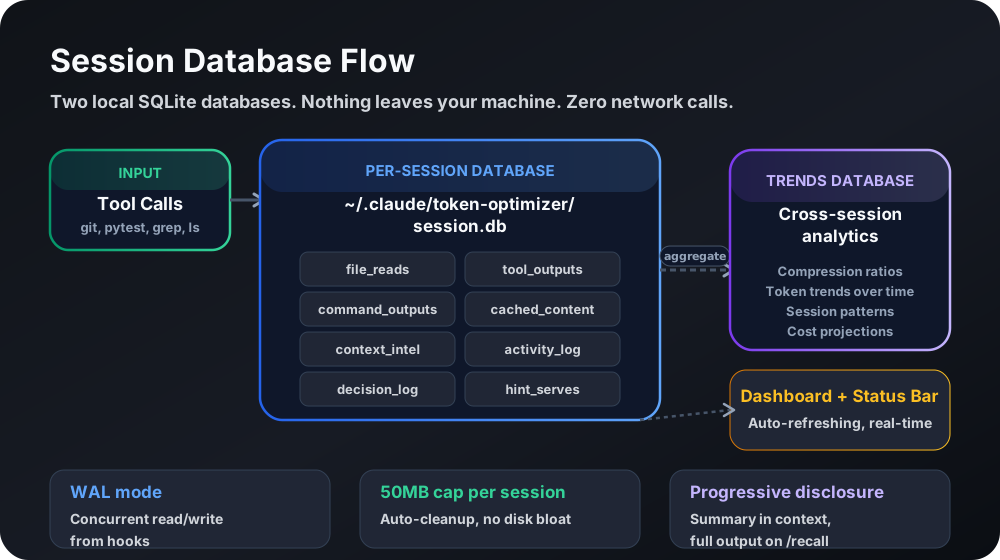
On macOS and Linux, every store is created with restrictive permissions: directories 0o700 (owner only), files 0o600 (owner read/write only). On Windows, Python cannot apply these POSIX modes (os.chmod only toggles the read-only flag), so the stores inherit the access rules of your user profile folder, which by default grants access only to your account, Administrators, and SYSTEM.
| Store | Contents | Path | Retention |
|---|---|---|---|
| Session metrics database | Per-session aggregates: token counts, model usage, cost estimates, session UUIDs, JSONL paths | <plugin-data>/data/trends.db | TOKEN_OPTIMIZER_TRENDS_RETENTION_DAYS (default unlimited) |
| Per-session file cache | File-read records, content hashes, token estimates, cached content up to 50KB per file (credential-redacted) | <plugin-data>/data/session-store/<id>.db | Auto-deleted after 48 hours |
| Checkpoints | Truncated conversation context, extracted decisions, error snippets, todos | ~/.claude/token-optimizer/checkpoints/ | TOKEN_OPTIMIZER_CHECKPOINT_RETENTION_DAYS (default 7), newest TOKEN_OPTIMIZER_CHECKPOINT_PER_SESSION per session (default 5), at most TOKEN_OPTIMIZER_CHECKPOINT_RETENTION_MAX in total (default 400) |
| Tool archives | Tool output at or above 4,096 characters, credential-redacted and capped at 5,242,880 characters | <plugin-data>/data/tool-archive/<id>/ | TOKEN_OPTIMIZER_ARCHIVE_RETENTION_HOURS (default 24) |
| Quality cache | Per-session quality-score snapshots | ~/.claude/token-optimizer/quality-cache-*.json | TOKEN_OPTIMIZER_QUALITY_CACHE_RETENTION_DAYS (default 7) |
| Config | Feature flags, consent status, pricing tier, timestamps | ~/.claude/token-optimizer/config.json | Persistent; inspect the purge list |
| Checkpoint event log | Checkpoint telemetry events | ~/.claude/token-optimizer/checkpoint-events.jsonl | Rotated at 1000 entries |
| Live fill cache | Current context-fill value for the status line | ~/.claude/token-optimizer/live-fill.json | Overwritten continuously |
| Dashboard | Generated HTML visualization | <plugin-data>/data/dashboard.html | Regenerated on demand |
| Daemon token | 32-byte random secret for dashboard POST auth | <plugin-data>/data/daemon-token | Persistent (0600) |
| Daemon logs | Dashboard server stdout/stderr | <plugin-data>/data/logs/ | Persistent; inspect the purge list |
The history database holds JSONL file paths, which embed your local username as a path component. Checkpoints hold truncated conversation snippets (up to 300 characters of the last user and assistant messages, error snippets up to 150 characters) that may contain anything you typed into the coding assistant.
Credential handling
Section titled “Credential handling”Token Optimizer scans for 34 built-in credential pattern entries (AWS keys, API tokens, GitHub PATs, database URIs, JWTs, PEM keys, and more) and replaces each with [CREDENTIAL REDACTED: <type>] before writing to the session store and tool archive. Redaction is one-way and permanent in stored content.
Two deliberate tradeoffs follow from this:
- Delta reads against a file containing a credential produce a non-empty diff on every re-read, because the stored copy holds the redacted placeholder and the live file holds the real value. Security wins over efficiency here.
- Bash compression output preserves credential-containing lines verbatim rather than redacting them, so the compressed output returned to the model never mangles a secret the model needs to act on.
Custom redaction patterns
Section titled “Custom redaction patterns”You can add your own secret shapes (internal API keys, service tokens, record identifiers) to the built-in list without editing code. Put them in ~/.claude/token-optimizer/redact-patterns.json (on other platforms, token-optimizer/redact-patterns.json under that platform’s home, e.g. ~/.codex/), or set TOKEN_OPTIMIZER_REDACT_PATTERNS_FILE to the path of the file, either in your environment or in the env block of your global settings.json (~/.claude/settings.json; hooks do not read project-level settings):
{ "patterns": [ "acme_[A-Za-z0-9]{32}", {"label": "Acme service token", "regex": "(?P<keep>ACME_TOKEN=)\\S+", "ignore_case": true} ]}- Each entry is a Python regular expression, either as a plain string or as an object with
regex, an optionallabel(shown in the placeholder, defaultcustom pattern), and an optionalignore_case. JSON strings need doubled backslashes (\\dfor\d). - Text matched by a named group
keepstays in place and only the rest of the match is replaced, the same way the built-in?token=pattern keeps the parameter name. TOKEN_OPTIMIZER_REDACT_PATTERNS_FILEmust be an absolute path after~and environment-variable expansion (surrounding quotes are stripped first). A relative value would resolve against whatever directory the hook launched in, so it is treated as a configuration error — see fail-closed behavior below.- Custom patterns are additive and run BEFORE the built-ins, so an org pattern can claim a composite secret (e.g.
MEDX-123456-<jwt>) whole instead of leaving a readable prefix beside a built-in placeholder. Neither custom nor built-in patterns touch[CREDENTIAL REDACTED: ...]placeholders already in the text, so re-running redaction is idempotent. Custom patterns apply everywhere the built-in redaction applies; when scanning rather than rewriting, they are matched per line. They do not change which lines Bash compression keeps verbatim. - The file is read once per process. Invalid entries (bad regex, empty regex, a regex that matches empty text, wrong types, unsafe or over-broad shapes) are skipped with a warning on stderr; the rest still load. A missing file at the default location is ignored. Limits: 200 entries, 1,000 characters per regex, 1 MB per file.
- Fail closed: if the configured file — or a file present at the default location — cannot be trusted (unreadable, invalid JSON, wrong shape, or a relative env path), custom redaction is considered broken rather than absent. Every write that redacts (archives, caches, checkpoints) is then skipped so content your own patterns were meant to cover never reaches disk unredacted, and a one-time warning is shown through the hook’s normal output channel. Fix or remove the file to resume writes.
- Unsafe patterns are rejected before they can run: the loader statically rejects nested unbounded quantifiers and ambiguous repeated alternations (the classic “regex hangs forever” shapes), then runs each remaining pattern once against a battery of adversarial strings in a separate process with a hard time limit — a pattern that cannot finish in time is rejected. Verdicts are cached per file content, so this costs nothing on steady-state hook runs.
measure.py security-reportshows whether custom redaction is active, how many patterns loaded, from which file, and any rejections; the same status is persisted under the runtime’stoken-optimizer/directory.- This is pattern-based redaction of known shapes. It is not a general PII or PHI scrubber, and it cannot catch values that have no recognizable shape.
Consent
Section titled “Consent”The Python hook runner uses notice/opt-out flags, not a strict affirmative-acknowledgment barrier. Missing, symlinked, or unreadable consent config fails open; absent flags also fail open during bootstrap. First-run welcome records the notice as shown. A present false consent flag (for example after consent --reset) gates non-exempt hook work, but ensure-health/bootstrap is exempt. Do not treat this mechanism as proof that no collection can happen before a person acknowledges the notice.
python3 measure.py consent --show # check statuspython3 measure.py consent --grant # grantpython3 measure.py consent --reset # revokeConsent is tracked per-runtime. Claude Code and Codex can have separate notice records; inspect the resolved config rather than assuming one record covers both. Users who saw the earlier welcome notice are backfilled only when the explicit consent key is absent; a present false value is not overwritten by that backfill.
The bookmarkable dashboard URL has its own separate consent, managed with daemon-consent. So does Keep-Warm, which is opt-in and requires keepwarm-enable.
Transcript preservation
Section titled “Transcript preservation”To keep history for trend analysis, on the Claude settings path, Token Optimizer fills in cleanupPeriodDays=99999 only when that key is absent. An existing user value is preserved; this is not a setting applied to every host platform. That is the host platform’s cleanup setting for the host platform’s own transcripts, not a Token Optimizer data store. You can override it in your settings.json, and purge does not delete transcripts because they belong to the host platform.
On Claude Code 2.1.243+, Token Optimizer also measures whether subagentPromptCacheTtl: "1h" pays on your own history and recommends it. It does not set the key by default. subagent-cache enable applies the recommendation, subagent-cache disable undoes a Token Optimizer set (final), TOKEN_OPTIMIZER_SUBAGENT_CACHE_1H=0 opts out of every write, and TOKEN_OPTIMIZER_SUBAGENT_CACHE_1H=1 opts in to the automatic write plus its 14-day negative-payoff tripwire. It never overrides a value you set, an environment override, or a managed/project/local settings file. The payoff check reads your session transcripts locally in a background process, keeps one small verdict file in Token Optimizer’s data directory, and leaves nothing off the machine. See Subagent prompt cache.
The daily usage-recommendations measurement works the same way: a detached background process (spawned at session start or when the dashboard collects its data) reads your transcripts and writes usage_recommendations.json plus a capped history file (usage_recommendations_history.jsonl, 180 lines) in Token Optimizer’s data directory. They feed the recommendations command and the dashboard’s “From your own usage” section, and never leave the machine. This daily recommendations path never writes either setting. Separate explicit subagent-cache enable or the automation opt-in can write subagentPromptCacheTtl; compact-window advice never writes autoCompactWindow.
Deleting your data
Section titled “Deleting your data”The Python purge command deletes the supported Python-managed and legacy data directories it lists. The separate Pi extension uses /token-optimizer purge all; do not assume a Python purge covers every adapter’s store. It is dry-run by default.
python3 measure.py purge # dry-run: lists what would be deletedpython3 measure.py purge --confirm # delete the history db, checkpoints, archives, cachespython3 measure.py purge --confirm --force # delete and also stop the daemonTo delete by hand instead, remove these directories:
~/.claude/token-optimizer/~/.claude/plugins/data/token-optimizer-*/~/.claude/_backups/token-optimizer/- Codex:
~/.codex/token-optimizer/ - OpenCode: remove the resolved data root, which holds
trends.dbandsessions/. An explicit plugindataDiroption wins overTOKEN_OPTIMIZER_DATA_DIR; either is used verbatim. When neither is set, the OS defaults are:- Linux:
$XDG_DATA_HOME/token-optimizer/, or~/.local/share/token-optimizer/whenXDG_DATA_HOMEis unset or blank. - macOS:
~/Library/Application Support/token-optimizer/. - Windows:
$LOCALAPPDATA/token-optimizer/, or~/AppData/Local/token-optimizer/whenLOCALAPPDATAis unset or blank.
- Linux:
For OpenCode, check the plugin option and environment before deleting. A custom root may be anywhere, including inside a project; deleting only the OS default can leave private session data behind.
For a deletion request or uninstall, purge is one cleanup step, not a guarantee that every Token Optimizer store is removed. Review its dry-run list before deleting. It leaves host transcripts intact, but is not a substitute for the separate Pi purge or for checking unlisted adapter directories.
Cross-platform
Section titled “Cross-platform”Normal measurement is local on every adapter, but data paths, consent, redaction, and retention mechanisms differ. Pi has separate opt-ins and purge; Cowork may use explicitly configured org telemetry/probes; the manual desktop refresh invokes the host. Do not infer identical architecture from shared branding. On Hermes, the adapter opens state.db read-only and immutable (mode=ro&immutable=1 with PRAGMA query_only = ON) and never writes back to it.
Source available
Section titled “Source available”The full source is published at github.com/alexgreensh/token-optimizer and can be audited by anyone. For the security architecture in depth (loopback binding, token-gated POST endpoints, access controls), run measure.py security-report or see Health and diagnostics. For privacy questions, contact Alex Greenshpun or open a GitHub issue.